Features
Small app. Everything it needs.
Xiaomi's no-freeze list
Apps HyperOS never freezes
- Google Play services On the list Removed by Xiaomi Back on the list
- WhatsApp On the list Removed by Xiaomi Back on the list
- Messenger On the list
- Gmail On the list
- 14 of Xiaomi's own entries, kept as they are




Back in 1.8 s
Google Play services asked to reconnect
Keeps your apps on Xiaomi's no-freeze list
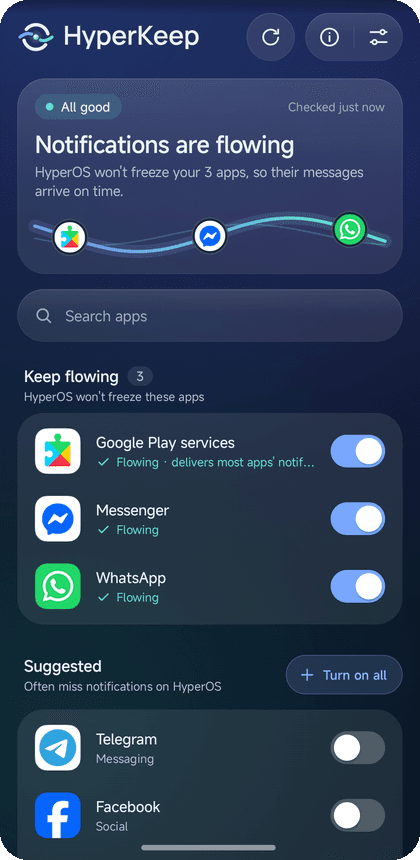
One switch per app
Turn an app on and HyperKeep adds it to the list HyperOS never freezes. Turn it off and it comes off again.
Puts apps back in about 2 seconds
Xiaomi rewrites its list when you install apps or change battery settings. HyperKeep notices and restores your apps, measured at 1.5 to 1.8 seconds.
Google Play services included
It delivers most apps' push notifications, yet Xiaomi gives it no switch. HyperKeep keeps it listed and asks it to reconnect after a repair.
Starts after a restart
Optional. HyperKeep checks the list again after the phone boots, so nothing slips through.
Alerts only when it matters
Optional alerts tell you if an app drops off and can't be put back. Otherwise HyperKeep stays quiet.
WhatsAppnow
Riya: On my way, 5 min
Messengernow
Sam: Landed. Where are you?
Gmailsent 9:41
2 new emails, 36 min late
Kept
Gmail
Frozen
Messenger
Kept

Telegram
Frozen
Nearly zero battery drain, and less for your other apps
Sleeps until it's needed
Nothing runs on a loop. Android watches Xiaomi's list for HyperKeep and wakes it only when the list changes.
Milliseconds of work
Each fix takes a few milliseconds. In a 10-minute screen-off test, HyperKeep used no measurable battery.
Your apps stay on Battery saver
No need to set every chat app to "No restrictions". HyperKeep spots apps that are and shows you how to switch back.
No Recents locks needed
Locked apps run all the time and hold memory. HyperKeep tells you which kept apps are locked so you can unlock them.
No wake locks
HyperKeep holds no wake locks. In its default mode it keeps no service running and shows no notification.
Zero frames when idle
Even the app's animations play once and stop. An open, idle HyperKeep draws nothing.
Keep-alive app
checks every 15 min
96 wake-ups
HyperKeep
wakes when Xiaomi changes its list
3 wake-ups
Illustration of one day: a keep-alive app against HyperKeep.
Shows exactly what to change, and why
Autostart check for every app
Chat apps need Autostart to wake for new messages. HyperKeep shows which ones have it off and opens their page.
"Save battery" tips
If an app you keep is on "No restrictions", HyperKeep suggests Battery saver and opens that app's battery page.
Recents lock tips
Finds kept apps that are locked in Recents and shows how to unlock them in two taps.
Re-checks when you return
Come back from a settings page and every status updates by itself, a moment later too, because Xiaomi applies some switches late.
Suggested apps
Popular chat, social, mail and work apps that often miss notifications on HyperOS, from a list of 61. Only the ones you have.
Setup in about a minute
Two permissions and two switches for HyperKeep itself, each opening the right Xiaomi page. Nothing is turned on until you choose.
Flowing
Messenger
Autostart is off · Tap to fix
Gmail
No restrictions · Tap to save battery

Locked in Recents · Tap to unlock
Battery saver
No restrictions
Battery saver (recommended)
Close apps after 10 minutes of background activity
Restrict background apps
Everything is visible and reversible
Backups and restore
HyperKeep saves Xiaomi's original list before it changes anything. Restore it, or any backup, at any time.
History
A plain log of what changed and when: apps removed by Xiaomi, apps put back, and why.
Xiaomi's list, exactly
See the raw value of the list, and add an app by package name if you need to.
Smart or Eco checking
Smart, the default, reacts the moment Xiaomi changes its list. Eco skips the live trigger and checks about every 12 hours. You also choose whether problems are fixed automatically.
Export and import
Save your apps, settings and list backups to a file, and bring them back later or on a new phone.
Diagnostics
A readable report of your phone, HyperOS version, ROM region and HyperKeep's status, for when you need help.
History
What changed, and why
- Messenger put backXiaomi removed it after an app install21:14
- Google Play services put backXiaomi rebuilt its list18:03
- WhatsApp turned onAdded to Xiaomi's list09:12
- Original list backed upSaved before the first change09:11
Private and careful by design
No ads, no analytics, no account
Nothing about you or your phone leaves it. The only network use is checking GitHub for HyperKeep's own updates.
Verified updates
Each update is checked for size, checksum and the developer's signature before Android installs it. Your apps and settings stay.
Tells you about new versions
One notification when a new version is out, from a tiny daily check Android runs when the phone is online.
Same signing key, every release
Updates install over the old version, and your apps, settings and permissions stay.
Keeps Xiaomi's own entries
HyperKeep only adds your apps. Anything Xiaomi put on the list stays there.
HyperKeep · now
New update available
Version 1.0.2 is out. Tap to update. Your apps, settings and permissions stay.
Update available
HyperKeep 1.0.2 · 2.9 MB
Feels like part of HyperOS
HyperOS-style glass
Frosted surfaces, real blur where HyperOS uses it, and smooth 120 Hz scrolling (1 janky frame in 2,608).
Light, dark or system
Follows your phone, or pick one. Every color meets contrast guidelines on glass.
Search and system apps
Search every app, and show background system apps when you need them.
Small and light
About a 3 MB download. Respects "Remove animations" and HyperOS's back gestures.

Get your notifications on time
Free for China ROM Xiaomi, Redmi and POCO. Set up in about a minute.
Version 1.0.2, free APK, 2.9 MB. Android 12 or newer. Updated November 21, 2026.
- Free, no root
- Nearly zero battery drain
- No ads or account