For China ROM Xiaomi, Redmi and POCO
Get your Xiaomi notifications on time.
On the China ROM, HyperOS freezes WhatsApp, Gmail and Messenger to save battery, so messages arrive late. HyperKeep keeps them reachable, and uses almost no battery itself.
How to set up HyperKeep
A real recording, start to finish, in 68 seconds. Or follow these four steps.
- 1Download and install the APK.
- 2Allow the two permissions Xiaomi shows first.
- 3Turn on Autostart and No restrictions for HyperKeep only.
- 4Choose your apps, starting with Google Play services.
What HyperKeep does
Three steps. You only do the first one.
1.You choose your apps
Turn on WhatsApp, Gmail, Messenger and anything else that must stay reachable. Google Play services is suggested first.
2.HyperKeep keeps them on Xiaomi’s list
Xiaomi has a list of apps it never freezes. HyperKeep keeps your apps on it, and puts them back within 2 seconds when Xiaomi removes them.
3.Messages arrive on time
Your apps stay reachable, so notifications come in when they are sent, while everything stays on Battery saver.
1Choose
2Keep
3On time
Keep flowing01234
HyperOS won't freeze these apps
Google Play services
Suggested first Flowing
WhatsApp
Messaging Flowing
Gmail
Email Flowing
Messenger
Messaging Flowing
Telegram
Messaging





Xiaomi's no-freeze list
Apps HyperOS never freezes
- Google Play services On the list
- WhatsApp On the list Removed by Xiaomi Back on the list
- Gmail On the list
- Messenger On the list
HyperKeep put it back in 1.8 s
9:419:449:52
Riya · On my way, 5 min
Parcel delivery · Your parcel is at the door
Sam · Landed. Where are you?
Stop paying battery for your notifications
The usual tips work by keeping apps awake all day. HyperKeep only acts when Xiaomi changes its list.
One day, screen off
Times the phone is woken
Without HyperKeep
With HyperKeep
- WhatsApp and Gmail messages arrive when you unlock the phoneMessages arrive when they are sent
- Every chat app set to No restrictions, running in the background all dayYour apps stay on Battery saver (recommended)
- Apps locked in Recents, holding memory all the timeNothing to lock in Recents
- The fixes stop working whenever Xiaomi rewrites its listFixed again automatically, a few milliseconds each time
It shows you exactly what to tap
Some settings only you can change. HyperKeep checks every app you keep and points out the one thing that gets in the way, then opens the right Xiaomi page.
Autostart is off
Chat apps need it to wake for new messages. HyperKeep opens that app’s page.
No restrictions, costing battery
Not needed with HyperKeep. One tap back to Battery saver (recommended).
Locked in Recents
Also not needed. HyperKeep shows how to unlock it.
Flowing
Messenger
Autostart is off · Tap to fix
Gmail
No restrictions · Tap to save battery

Locked in Recents · Tap to unlock
Battery saver
No restrictions
Battery saver (recommended)
Close apps after 10 minutes of background activity
Restrict background apps
Nearly zero battery drain, measured on a real phone
HyperKeep sleeps until Xiaomi changes its list. Android wakes it, it fixes the list, and it sleeps again.
- of work each time Xiaomi changes its list
<35ms
of work each time Xiaomi changes its list
- to put an app back after Xiaomi removes it
~2s
to put an app back after Xiaomi removes it
- services running in the background
0
services running in the background
- setting changed, and backed up first
1
setting changed, and backed up first
Keep-alive app
checks every 15 min
96 wake-ups
HyperKeep
wakes when Xiaomi changes its list
3 wake-ups
Everything it does for you
Choose your apps
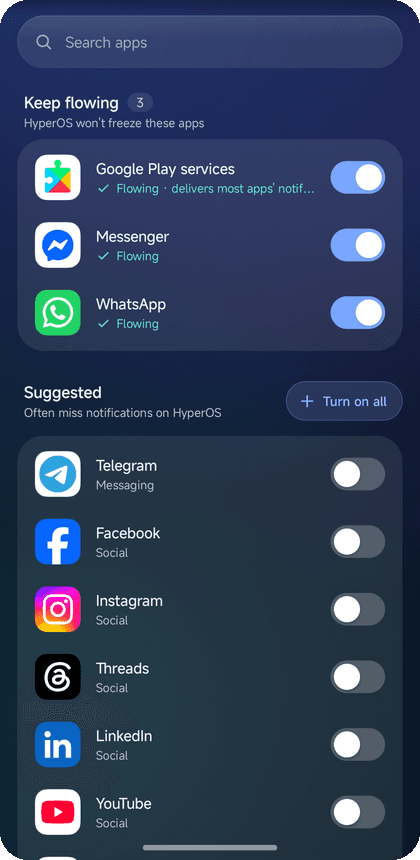
One switch per app. Popular chat, mail and work apps are suggested, only the ones you have.
Puts apps back in about 2 seconds
When Xiaomi rewrites its list, HyperKeep restores your apps and asks Google Play services to reconnect.
Xiaomi's no-freeze list
Apps HyperOS never freezes
- Google Play services On the list Removed by Xiaomi Back on the list
- WhatsApp On the list Removed by Xiaomi Back on the list
- Messenger On the list
- Gmail On the list
- 14 of Xiaomi's own entries, kept as they are
Back in 1.8 s
Google Play services asked to reconnect
Google Play services included
It delivers most apps' notifications, but Xiaomi gives it no switch. HyperKeep keeps it on the list.
Backups and history
Xiaomi's original list is saved first. Restore it any time, and see what changed and when.
Verified updates
HyperKeep offers each new version on its Home screen and checks the size, checksum and signature before Android installs it. Your apps and settings stay.
Update available
HyperKeep 1.0.2 · 2.9 MB
Made for the China ROM
Imported phones, China-only models like the Redmi K series, and China ROMs you flashed yourself. HyperOS 1 to 4, Android 12 to 17.
To check yours, open Settings, About phone. If the HyperOS version has CN near the end, you have the China ROM.
About phone
- Device name
- Redmi K90
- HyperOS version
- OS4.0.6.0.XPKCNXM
- Android version
- 17
About phone
- Device name
- Xiaomi 15
- HyperOS version
- OS2.0.105.0.VOCMIXM
- Android version
- 15
Safe to install, every release
Before a version is published, it's scanned for malware, checked for trackers and matched to HyperKeep's signing key. If a check fails, it isn't published. The results are public.
Scanned for malware
VirusTotal’s antivirus engines check every APK, and each release links to the report.
No trackers
Checked against all 432 tracker signatures from εxodus Privacy.
One signing key
Every release has the same key, so only a genuine update can replace HyperKeep.
Checked updates
The app checks every update’s size, checksum and signature before it installs.
HyperKeep 1.0.2
Checked before it was published
- Signed with HyperKeep’s keyB5:06:E4:AF…AE:28
- No trackers0 of 432 known trackers
- Antivirus scanNo engine flagged it
- Checksum publishedSHA-256 8f381098…
Every check passed
Safe by design
Changes one Xiaomi setting
Its list of apps that are never frozen. Xiaomi’s own entries stay.
Saves the original first
Restore it, or any backup, whenever you like.
Sends nothing about you
No ads, no analytics, no account.
Your other settings stay yours
Autostart, battery settings and Recents locks: HyperKeep only opens the page.

Questions
Does HyperKeep drain the battery?
No. HyperKeep sleeps until it's needed. Android wakes it only when Xiaomi changes its list, and each fix takes a few milliseconds. In a 10-minute screen-off test, HyperKeep used no measurable battery.
It usually saves battery overall, because your apps can stay on Battery saver instead of No restrictions, and you don't need to lock them in Recents. See the measured numbers.
Do I still need to set my apps to "No restrictions"?
No. Only HyperKeep itself needs No restrictions. For your other apps, No restrictions lets them skip Android's Doze and run freely in the background, which costs battery. HyperKeep already stops HyperOS from freezing them, so the recommended Battery saver is enough.
If an app you keep is on No restrictions, HyperKeep shows a Save battery tip and opens that app's battery page, so you can switch it back in one tap. Xiaomi doesn't let apps change this setting for you.
Do I need to lock my apps in Recents?
No. A lock keeps the app running all the time, which uses memory and battery. People lock apps so HyperOS doesn't close them, but HyperKeep already keeps their messages coming.
If an app you keep is locked, HyperKeep shows a tip. To unlock it, open Recents, long-press the app and tap the lock. Xiaomi doesn't let apps change locks, so you do it yourself.
Is HyperKeep a "keep-alive" app that runs all the time?
No. By default HyperKeep runs nothing in the background and shows no notification. It wakes for a few milliseconds to put an app back, then sleeps again, and the system can reclaim its memory in between.
There is no permanent notification and no background service. One mode is optional: Eco skips the live trigger and simply checks about every 12 hours, for the least activity possible.
Do I need root, Shizuku, ADB or Developer options?
No. HyperKeep is a single app. It needs two permissions (Modify system settings and Access list of installed apps) plus Autostart and No restrictions for itself, all set from normal settings pages. The setup guide walks through it in about a minute.
Which phones and Android versions does HyperKeep support?
Xiaomi, Redmi and POCO phones running the China ROM of HyperOS 1, 2, 3 or 4, with Android 12 to 17. That includes phones imported from China and China-only models such as the Redmi K series. Every release is tested on a real China ROM phone. If something doesn't work on your model, please report it. See compatibility.

Get your notifications on time
Free for China ROM Xiaomi, Redmi and POCO. Set up in about a minute.
Version 1.0.2, free APK, 2.9 MB. Android 12 or newer. Updated November 21, 2026.
- Free, no root
- Nearly zero battery drain
- No ads or account